• Skip to main content
  • Home
  • About
  • Advertise
  • Archive
    • All
    • 2025
    • 2024
    • 2023
  • CALENDAR
    • All
    • Governmental Entities
    • Homeowners’ Associations
    • Special Events
    • Weekly & Monthly
  • Contact Us
  • E-Edition
  • Sitemap
  • Topics
  • SEARCH
OCN

OCN

Volunteers reporting on community issues in Monument, Palmer Lake, and the surrounding Tri-Lakes area

OCN > 2311 > Palmer Lake Historical Society, Oct. 19 – History of Glen Eyrie presented

Palmer Lake Historical Society, Oct. 19 – History of Glen Eyrie presented

November 4, 2023

By Marlene Brown

The Palmer Lake Historical Society (PLHS) held its monthly meeting Oct. 19 at the Palmer Lake Town Hall. Amy Burch, manager of the bookstore at the Navigators located at Glen Eyrie and co-author of The Glen Eyrie Story, presented the story. The Navigators purchased the property in 1953 and continue to this day to house their headquarters for their worldwide ministry, castle tours, teas, overnight stays, conference center with a café and the bookstore. Many other events are allowed on the property. To book tours and for more information go to gleneyrie.org
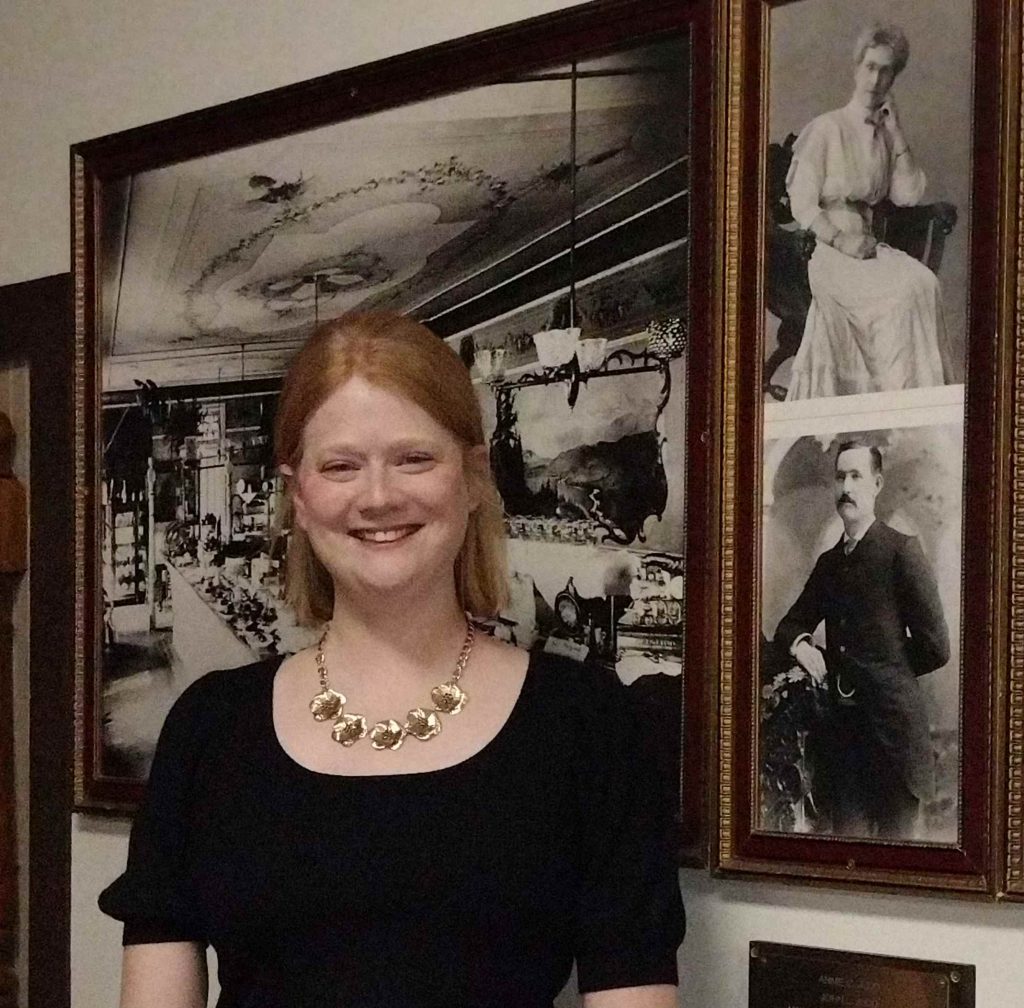
Above: Amy Burch, manager of the bookstore at Glen Eyrie and co-author of The Glen Eyrie Story, gave a PowerPoint presentation to the Palmer Lake Historical Society on Oct. 19 at the Palmer Lake Town Hall. Photo by Marlene Brown.

Glen Eyrie was the home of William J. Palmer (1836-1909) and his wife “Queen” (1850-94). Palmer purchased the property at the mouth of the canyon in Garden of the Gods and began building Glen Eyrie for his wife in 1871. His vision was to build an English Tudor-style castle in wilds of the West, in the newly opened lands of Colorado. Palmer was a brigadier general in the Union Army, president of the Denver and Rio Grande Railroad and founder of Colorado Springs. He had dreams of building Colorado Springs as the new Chicago or San Francisco. He founded Colorado College and built the first permanent building on campus that would eventually be downtown Colorado Springs. They had three daughters: Elsie, Dorothy, and Marjory.

As the railroad expanded and transportation to the West became easier, a train ran from Denver to Colorado Springs, opening trade between the two cities. Palmer Lake became a daily water stop. Palmer purchased the land known as the Monument Farms & Lake Property, which later become the Town of Palmer Lake. Palmer Lake was critical to the railroad because the steam engines chugged up to the Palmer Divide and had to take on water to head down. The lake was the only natural water supply available on a year-round basis. Passenger trains would stop for 10 minutes to take on water. (See palmerdividehistory.org/a-brief-history-of-the-palmer-divide-area.)

When Queen Palmer’s health deteriorated, she and the girls moved back East and then back to England, where William visited them many times. At the age of 44, Queen passed away and William brought the girls back to Colorado Springs to live in the 33,000-square-foot castle. There were 17 guest rooms, two dining rooms and 24 fireplaces. The castle sits at the base of Queen’s Canyon and is subject to floods that increased after the 2012 Waldo Canyon fire. Though there was no fire damage to Glen Eyrie, the canyon was stripped of vegetation and over a million dollars of flood mitigation was performed with debris nets and concrete barriers to allow water to flow through the grounds of Glen Eyrie.

After Palmer’s horse-riding accident and his death three years later, his daughters tried to give Glen Eyrie to the city of Colorado Springs, but city officials declined due to cost of maintaining the property. It was sold in 1922, and the property fell into disrepair and was closed. In 1938, oilman George Strake bought the Glen Eyrie property and then remodeled and updated it until the sale to the Navigators in 1953.

For more information on William J. Palmer, you are invited to attend the Palmer Lake Historical Society’s next meeting on Nov. 16, 7-8:30 p.m., for The Life and Times of General William Jackson Palmer presented by Jim Sawatzki, local author, and historian of the Palmer Divide area. The presentation in free and open to the public. The PLHS normally holds its meetings on the third Thursday of the month at the Palmer Lake Town Hall, 42 Valley Crescent St., Palmer Lake. For information about joining PLHS, go to https://palmerdividehistory.org/memberships/

Marlene Brown can be reached at marlenebrown@ocn.me.

Other Palmer Lake Historical Society articles

  • Palmer Lake Historical Society, Oct. 16 – Ancient days of Garden of the Gods explored (10/30/2025)
  • Palmer Lake Historical Society, Sept. 18 – Pioneers Museum: past and present (10/2/2025)
  • Palmer Lake Historical Society, July 19 – The power of print (7/31/2025)
  • Palmer Lake Historical Society, June 15 – Father’s Day Ice Cream Social (7/3/2025)
  • Palmer Lake Historical Society, May 15 – Author recounts life of Nikola Tesla (6/7/2025)
  • Palmer Lake Historical Society, April 17 – Women of the Colorado gold rush era (5/3/2025)
  • Palmer Lake Historical Society, April 21 – General Palmer’s life explored (4/5/2025)
  • Palmer Lake Historical Society, Jan. 16 – 2024 events recalled (2/1/2025)
  • Palmer Lake Historical Society, Dec. 19 – Palmer Lake holds 91st annual Yule Log Hunt (1/4/2025)
  • Palmer Lake Historical Society, Nov. 21 – Life of town hero explored (12/5/2024)
<- Between the Covers at Covered Treasures Bookstore – New fall releases
-> November Library Events – Program schedule change

CLICK HERE FOR PODCASTS or OCN UPDATES --- SIGN UP FOR: NEWSLETTERS or ADINFO --- RSS FEEDS: ARTICLES or PODCASTS or COMMENTS
Privacy Policy --- Copyright © 2001–2025. Our Community News, Inc., All rights reserved.

Accessibility Adjustments

Powered by OneTap

Accessibility Commitment for Our Community News, Inc.

At Our Community News, Inc., we are committed to making our digital presence as accessible and inclusive as reasonably possible for all users, including individuals with disabilities. Our goal is to improve the usability of wp.ocn.me and to support a more accessible experience for everyone, regardless of their abilities or the technologies they use.

Our Approach to Accessibility

We aim to align with the Web Content Accessibility Guidelines (WCAG), which define internationally recognized standards for digital accessibility. While full compliance cannot always be guaranteed, we strive to implement improvements where feasible and regularly review accessibility-related aspects of our website. Accessibility is an ongoing process, and we are committed to improving the experience over time as technologies, standards, and user needs evolve.

Accessibility Features

To support accessibility, wp.ocn.me may utilize tools such as the OneTap accessibility toolbar. This interface provides users with a range of helpful features, including:
  • Adjustable text size and contrast settings
  • Dark mode for those who prefer that presentation
  • Highlighting of links and text for better visibility
  • Quick launch via keyboard shortcut: Alt + . (Windows) or ⌘ + . (Mac)
Please note the following:
  • The availability and effectiveness of these features depend on the website's configuration and ongoing maintenance.
  • While we strive to ensure accessibility, we cannot guarantee that every part of wp.ocn.me will be fully accessible at all times. Some content may be provided by third parties or affected by technical constraints beyond our immediate control.

Accessibility Tools

We implemented an accessibility icon on the upper right of the screen. It is a figure with arms and legs outstretched in a dark gray circle. Clicking on the accessibility icon will open a toolbar with many options to adjust the text and the screen. We also implemented a dark mode tool, which appears to the left of the accessibility icon as a smaller circle that initially is half-gray and half yellow indicating the screen will adjust to the system’s dark mode setting. Clicking on the dark mode tool will switch it to a sun icon meaning light mode. Clicking again will switch it to a moon icon meaning dark mode. Clicking again brings it back to half-and-half. If the accessibility tools are obstructing something you want to view, you can open the accessibility toolbar and select "Hide toolbar." Leave the setting at the default of “Only for this session” and click Hide Toolbar. That will reveal a small dark circle containing a minus sign. If you click on the minus sign, the dark mode tool will be removed and the minus will change to a plus. Click on the plus sign to bring back the accessibility icon and the dark mode tool.

Feedback and Contact

We welcome your feedback. If you experience any accessibility barriers or have suggestions for improvement, please contact us: Email: johnheiser@ocn.me We are committed to reviewing all inquiries and aim to respond within 3–5 business days. If you require assistance accessing any part of this website, we are happy to provide support through alternative channels upon request. Last updated: November 3, 2025
How long do you want to hide the toolbar?
Hide Toolbar Duration
Select your accessibility profile
Vision Impaired Mode
Enhances website's visuals
Seizure Safe Profile
Clear flashes & reduces color
ADHD Friendly Mode
Focused browsing, distraction-free
Blindness Mode
Reduces distractions, improves focus
Epilepsy Safe Mode
Dims colors and stops blinking
Content Modules
Font Size

Default

Line Height

Default

Color Modules
Orientation Modules

Keep up-to-date on Tri-Lakes area news and upcoming events with our free OCN App!

Check It OutAlready InstalledNo, Thanks

Subscribe to our newsletter for the latest Tri-Lakes news and website updates!

Sign Up NowAlready SubscribedNo, Thanks